AI assistants have gotten very good at answering questions. Handling an entire project pulling data from five different tools, building a spreadsheet, turning it into a deck, and keeping all of it updated as new information comes in has stayed stubbornly manual, even for people who use ChatGPT every day. ChatGPT Work, which OpenAI launched on July 9, 2026 alongside its GPT-5.6 models, is the company’s attempt to close that gap by turning ChatGPT from something you chat with into something you assign work to. This guide covers what it actually is, how it works step by step, who it’s genuinely useful for, what it costs, and where it still falls short.
What Is ChatGPT Work?
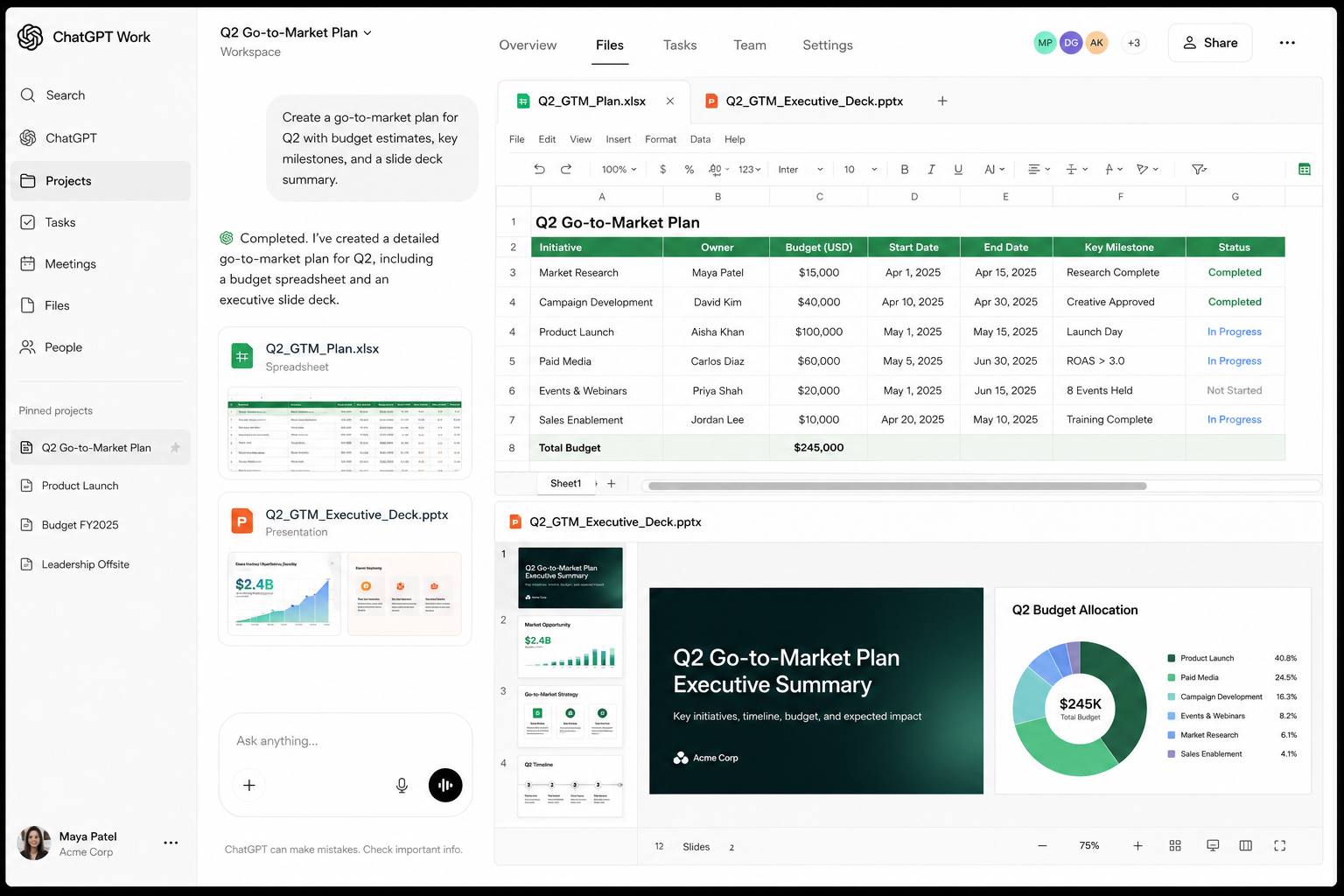
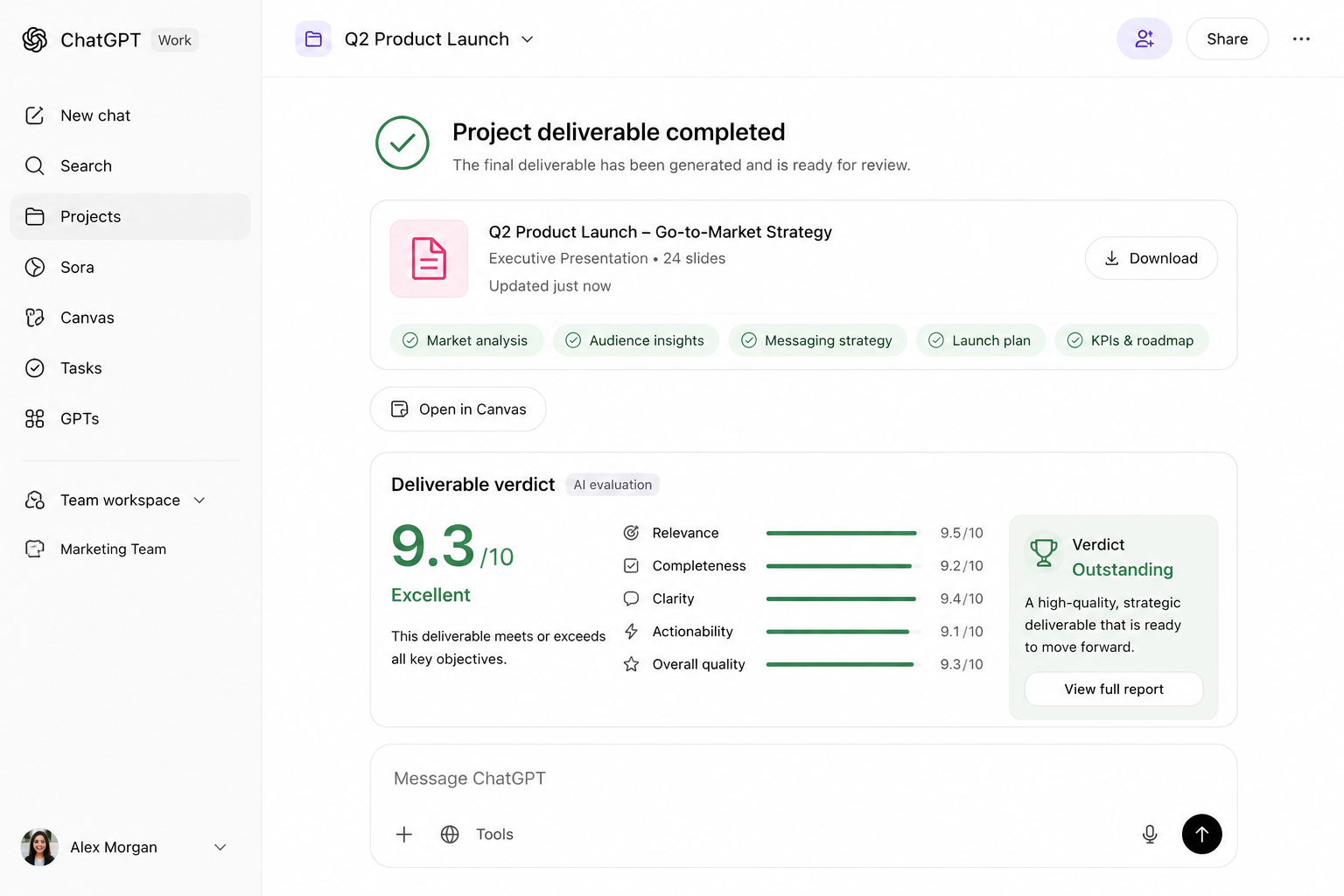
ChatGPT Work is an agent mode built into ChatGPT. Instead of asking a question and getting an answer, you describe an outcome “build a monthly budget tracker from this CSV,” “turn these meeting notes into a client ready deck” and ChatGPT Work gathers the context it needs from your connected apps and files, plans out an approach, and works through the task in steps, sometimes for hours, before handing you a finished spreadsheet, document, slide deck, or small web app.
OpenAI built this because ChatGPT’s biggest usage gap wasn’t capability, it was follow-through. The model could already draft a report or analyze a spreadsheet in conversation, but someone still had to open Excel, format the output, chase down the source files, and stitch everything together by hand. ChatGPT Work is meant to do that stitching itself.
The difference from regular ChatGPT is really a difference in what you get back. Regular ChatGPT answers questions inside a conversation. ChatGPT Work takes an assignment and delivers a finished artifact, built from your actual files and tools rather than from a single prompt’s worth of context.
Key Features
Unified Workspace
ChatGPT Work runs as its own workspace inside the ChatGPT app, sitting alongside your regular chats rather than buried in a settings menu. On desktop, OpenAI merged its standalone Codex coding app directly into the main ChatGPT app to make this possible the older, chat-only desktop app has been renamed ChatGPT Classic, and OpenAI’s separate Atlas browser is being phased out in favor of a built in browser inside the main app.
Codex Integration
Because Codex is now built directly into ChatGPT Work, the same agent that handles spreadsheets and slide decks can also work with code: reviewing pull requests, editing across multiple files, and running through diffs, all using the same underlying reasoning engine. You don’t need a separate coding app to get that capability anymore.
Document, Spreadsheet, and Slide Support
This is the core of what most people will use it for. Give it messy notes or a rough outline and it can produce a structured document. Give it a spreadsheet of raw data and it can produce a real workbook with tabs, formulas, and summaries, not just a table pasted into a chat window. Give it meeting notes and it can produce a formatted slide deck. These aren’t drafts you still have to rebuild they arrive as usable files.
Sites
Sites, currently in public beta, lets you turn a project into a shareable interactive website or web app: a dashboard, a project tracker, a launch calendar, an internal portal. ChatGPT can keep these updated automatically as the underlying data changes, which is a meaningfully different pitch than a static export a dashboard that refreshes itself rather than one you rebuild every Monday morning.
Third Party Integrations
ChatGPT Work connects to the tools people already work in Slack, Microsoft Teams, Google Drive, SharePoint, email, calendars, CRM platforms, and project management tools through a directory of more than 1,400 plugins. ChatGPT decides when to pull from a connected app automatically, or you can point it at one directly by typing “@” followed by the app’s name.
Scheduled Tasks and Governance
Scheduled Tasks let ChatGPT Work run a job once, repeat it on a schedule, or trigger automatically when something changes, like refreshing a dashboard every morning or updating a deck when new feedback comes in by email. On the governance side, OpenAI says ChatGPT Work is built on the same security and compliance foundation as ChatGPT Enterprise, with a Compliance API for oversight and an automated review layer that checks sensitive actions before they run. OpenAI reports its internal adversarial testing blocked all attempts to extract protected data, though that figure comes from the company’s own testing rather than independent verification, and it’s worth treating accordingly.
How ChatGPT Work Works
Getting a task done in ChatGPT Work follows roughly the same sequence every time:
Open ChatGPT on web, mobile, or desktop and switch to the Work workspace rather than a regular chat.
Connect what the task needs either upload a file directly or link a connector to wherever the real data already lives, like Google Drive or your CRM.
Describe the outcome you want, not the individual steps. In Plan mode, ChatGPT Work will gather context, ask clarifying questions, and lay out a step by step plan before it starts acting.
Let it work. Depending on the complexity, this can take minutes or run for hours in the background while you do something else.
Review the finished result a spreadsheet, deck, document, or site and ask for revisions the same way you’d give feedback to a colleague.
Real World Use Cases
Students can turn scattered lecture notes and readings into a structured study guide or summary document without manually reorganizing everything themselves.
Business professionals can hand off recurring reporting work, like a weekly account status update or a monthly budget reforecast, and get a finished deliverable rather than a rough draft to clean up.
Software developers get the Codex capabilities built directly into the same agent, so code review and multi-file editing happen without switching to a separate app.
Marketing teams can turn campaign data and briefs into leadership ready readouts. OpenAI’s own case studies describe this kind of workflow directly: a Zapier marketing lead used ChatGPT Work to build a lead triage and reporting system that previously took 35 to 45 minutes of manual work per lead across several tools.
Researchers can hand off a research question along with source material and get back a cross referenced brief while working on something else in parallel.
Small business owners can automate the kind of recurring, tool hopping admin work, like an event registration tracker built from spreadsheets and feedback forms, that used to require dedicated staff time every cycle.
ChatGPT Work vs Regular ChatGPT
Regular ChatGPT
ChatGPT Work
Answers questions in conversation
Completes multi-step projects independently
Single conversations, limited context
Pulls context across connected apps and files
Basic file uploads for reference
Deep integration with Slack, Drive, CRM, and 1,400+ plugins
Produces text or code in-chat
Produces finished spreadsheets, decks, docs, and web apps
Works in real time, one exchange at a time
Can work independently for hours on a single task
Pros
The biggest advantage is genuinely finishing something rather than producing a draft you still have to assemble. The plugin ecosystem is broad enough to cover most common business tools out of the box, and Scheduled Tasks turn one off automation into something that keeps running without you. For teams already paying for ChatGPT Business or Enterprise, the governance and compliance layer is a real differentiator against competitors that haven’t built out the same admin controls.
Cons
It’s still early. OpenAI’s own benchmark comparisons show Claude Fable 5 edging out GPT-5.6 Sol on the professional work benchmark most relevant to this product, and those numbers come from OpenAI’s own launch materials rather than independent testing. The “blocked 100% of extraction attempts” security claim is self-reported, not third-party verified. And because ChatGPT Work shares a usage pool with Codex, heavy use of complex, multi step projects can burn through plan limits faster than casual chat use ever would. Analysts have also noted OpenAI is playing catch up here Constellation Research’s Holger Mueller framed the launch as OpenAI needing to prove rapid enterprise uptake against rivals who already have stronger footholds in that market.
Pricing and Availability
ChatGPT Work isn’t a separate paid add on it’s included in existing ChatGPT plans, but it uses a metered usage model shared with Codex, meaning more complex projects consume more of your plan’s included usage. It rolled out first, on July 9, to Pro, Enterprise, and Edu users on web and mobile, with Plus and Business users gaining access within the following days. Free and Go users get access to ChatGPT Work as well, though it runs on Terra, the lighter GPT-5.6 model, rather than the flagship Sol model available to paid plans. On desktop, ChatGPT Work is available across all plans from day one, since it arrived through the Codex ChatGPT app merger rather than a separate rollout.
Is ChatGPT Work Worth Using?
It depends entirely on whether your work involves recurring, multi tool projects or mostly one off questions. If you regularly find yourself manually pulling data from three different apps into a single report, or rebuilding the same tracker every week, ChatGPT Work is likely to save real time, and the connector coverage means most common business tools are already supported. If your use of ChatGPT is mostly quick answers, brainstorming, or single-turn writing help, you probably won’t notice much difference, and there’s no reason to change your workflow just because the feature exists. For teams already invested in ChatGPT Enterprise or Business, the governance controls make this a lower-risk adoption than it would be for an individual connecting sensitive client data through a Plus account.
FAQS
The Bottom Line
ChatGPT Work represents OpenAI’s clearest attempt yet to move ChatGPT from a tool you consult to a tool you delegate to, and the underlying idea, an agent that gathers its own context and hands back a finished file instead of a draft, addresses a real gap in how people actually use AI day to day. Whether it’s worth adopting comes down to how much of your work is genuinely repetitive and multi-tool versus how much is one-off conversation. The feature is new enough that some of the rougher edges, particularly around benchmark transparency and real world reliability outside OpenAI’s own case studies, are still being worked out. For teams with recurring reporting, tracking, or research workflows spread across several apps, it’s worth testing on one workflow you already know well before rolling it out further.
Related Reading
ChatGPT Work Review July 15, 2026 Overview ChatGPT Work is OpenAI’s bet that the future of…

Leave a Reply